Local SEO
Google Business Profile Edits Pending: Why Changes Are Delayed or Rejected
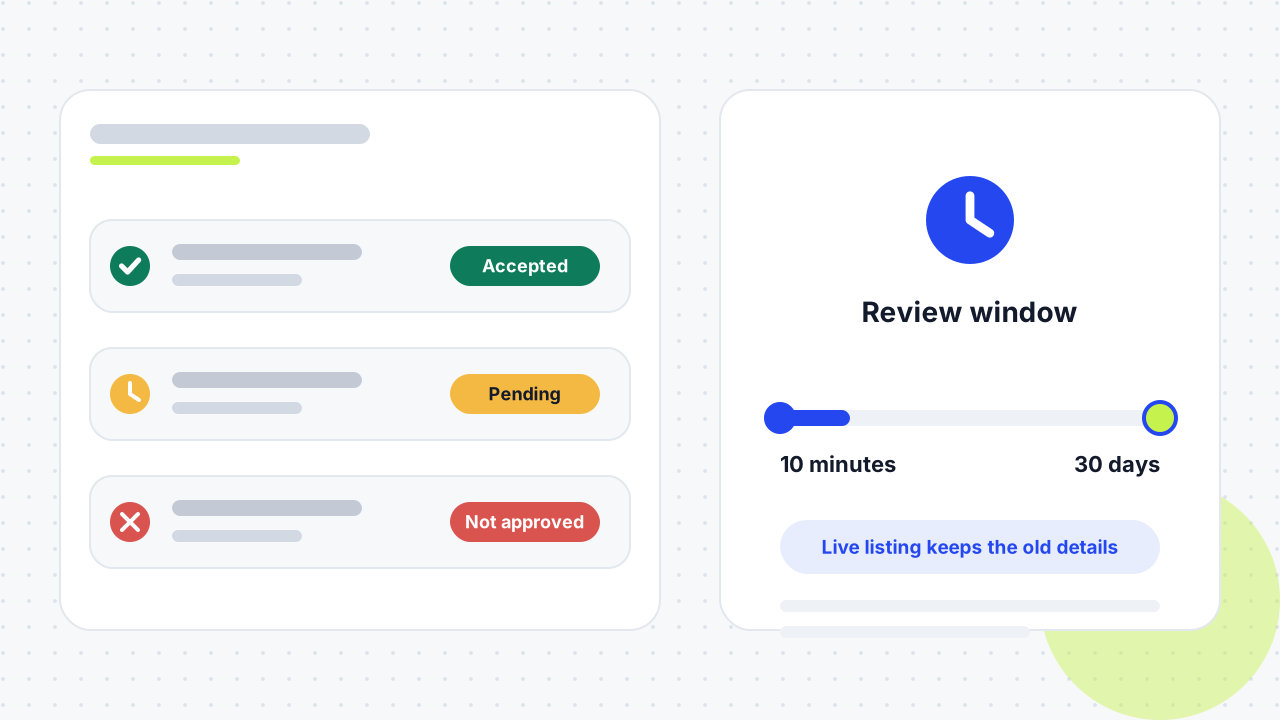
A Google Business Profile edit is pending while Google reviews the change, and your live listing keeps the old details until it is accepted. Google says reviews usually take about 10 minutes but can take up to 30 days. If Google can't verify the change, it shows as not approved.

What does it mean when a Google Business Profile edit is pending?
Pending means Google has received your change and is still checking it against its guidelines for representing a business, so customers keep seeing the previous details. Google applies this review to edits on a verified profile, and the result is always one of three statuses.
The three edit statuses
- Accepted: the new information appears on your profile.
- Pending: the edit is still under review and is not live yet.
- Not approved: Google could not verify that the change is accurate. You may be able to appeal it.
What you can still edit before verification
An unverified profile can still change its business name, category, address, hours, phone number and website, but full editing needs verification. Google can also change your details itself when it receives reports that your info is wrong. In that case you get a notification and an alert in the Edit profile section.
Check the result in two places: the status in your profile manager and the public listing in a signed-out search. They do not always agree, and a mismatch is often a duplicate profile problem rather than a slow edit.
How long does a Google Business Profile edit stay pending?
Google says an edit usually takes about 10 minutes to review, but sometimes takes up to 30 days. That is the official range as of November 2026, and a few days of waiting is normal inside it.
The field you change matters. Hours changes tend to clear faster than changes to business name, address, phone number, primary category or website URL, which one agency calls the high-trust fields. A thread on the Google Business Profile Help community from May 2025 explains a jump from three days to 30 days the same way: Google wants to verify the change more carefully.
Why are my Google Business Profile edits delayed?
Most delays happen because Google wants stronger proof that the new detail is real and consistent. The usual causes are below.
Sensitive fields get extra checks
Changing the business name, address, phone number, primary category or website triggers more automated and manual review than a change to opening hours. If you change several of them together, the review slows further. If the category is the field you are changing, our Google Business Profile categories guide explains what to pick, and if the map pin is wrong, see how to fix a wrong business location on Google Maps.
The new details do not match the rest of the web
Google compares your edit with your website, social profiles and directory listings. If the website footer or an old Yelp, Apple Maps or chamber listing still shows the previous phone number or address, the edit can sit in pending or be refused. Fix the website first, because Google checks it early.
Too many edits at once, or repeated resubmissions
A bulk change to several fields can trigger review filters even when each change is valid. Submitting the same edit again while the first is open creates a second version and makes the record harder to read, so change one core field at a time.
Something else keeps rewriting your data
Another owner or manager, a scheduling or listing tool connected to the profile, or a public suggest an edit report can overwrite your change or push the old value back. Remove old employees, agencies and duplicate owners from access, and disconnect any app that still holds the old details.
The profile itself has a status problem
A profile that is unverified, recently suspended, reinstated or transferred can slow later edits. Heavy editing in a short period has the same effect. If the profile is suspended or verification has failed, fix that first with our guides to a suspended Google Business Profile and failed verification.
Why was my Google Business Profile edit not approved?
An edit is not approved when Google can't confirm it is accurate or when the new value breaks its guidelines for representing your business. Wording problems cause many rejections: a business name stuffed with keywords or city names, a category that does not describe what the business does, or a sales-heavy description.
What counts as proof depends on the field:
- Name: it should match your real branding, such as signage or registration.
- Address: it must be a place where customers genuinely visit.
- Category: it must describe the business, not a wish list of services.
- Phone number: it must reach the business, and the business must control it.
Several businesses sharing one address can also trigger location flags, especially when they use the same suite number and categories.
How do I fix a pending or rejected Google Business Profile edit?
Fix it by checking what customers see, matching your website and listings to the new value, and then waiting or appealing with proof for one field. Follow the steps in order.
- Check the public listing. Search for the business while signed out, open it in both Search and Maps, and confirm both open the same profile. If they show different profiles, you have a duplicate or ownership problem, not a stuck edit.
- Write a dated record. Note the field, old value, new value, status, date submitted and the proof you hold. Add screenshots of both the manager view and the public view on the same day.
- Make the web agree. Update the website header, footer and contact page, then the major directories and social profiles. Older advice to check the Q&A section no longer applies, because Google has replaced public Q&A with an AI-powered "Ask" button.
- Remove rival sources. Review who has access, and disconnect tools that still publish the old data.
- Leave the pending field alone. Don't resubmit the same change while review is open.
- Resubmit narrowly if it is rejected. Send one field, one value and your strongest proof.
- Re-check signed out once Google has processed the change.
How do I appeal a not-approved edit?
In the UK or EEA, eligible rejected edits can appear in the Business Profile appeals tool. In the United States, send the documented rejected edit to Business Profile support. For phone numbers, a Product Expert on Google's Help community pointed to a dedicated pending-edit form in a September 2026 thread, so look for that route when the phone field is stuck. Keep the appeal to one field and attach proof such as a business licence, new signage or a utility bill that shows the exact name and address.
What should you prepare before editing each field?
Prepare the proof and the matching web pages before you press save. The table shows what to line up for each field, built from Google's help page and the agency guidance above.
| Field | Review speed | Prepare first | Proof that helps |
|---|---|---|---|
| Business name | Slower, high-trust field | Make website and signage show the exact new name | Signage photo, registration or licence |
| Address and pin | Slower, high-trust field | Update website, citations and directories | Utility bill with name and address |
| Phone number | Slower, high-trust field | Test the number, update website footer and directories | Number controlled by the business |
| Primary category | Slower, high-trust field | Pick the most accurate category, not the most popular | Website pages that match the category |
| Website URL | Slower, high-trust field | Make sure the page loads and names the business | Matching contact details on the page |
| Hours | Usually faster | Check the website hours match | Hours on website or door signage |
When should you wait, and when should you contact Google?
Wait while the edit is recent and small, and contact Google when the wrong detail is already costing you customers or the 30-day window has passed. These checkpoints are editorial advice built around Google's stated 10-minute to 30-day window, not rules from Google:
- Day 0 to 3: don't touch the field. Fix the website and listings instead. One agency calls this a cooling-off period, because repeated saving and reverting can look like spam.
- Day 3 to 30: keep the record up to date. Only act early if the wrong detail causes real harm, such as a wrong phone number, a bad address pin or a broken website link.
- Past 30 days, or edits that keep reverting: contact Business Profile support with the full record, screenshots and proof.
If edits keep stalling because details disagree across the web, a local SEO audit shows which listings to fix first, and our local SEO service covers the clean-up.
Why does Google change my details back after an edit is approved?
Approved edits revert when Google updates your profile from reports and other sources, when another owner or connected tool resubmits the old value, or when the public result comes from a different profile. Compare the intended value with your website, public registration details and major listings. Then search Maps for an old-location or duplicate profile, because more edits to the correct profile won't change a duplicate that customers still see. Our duplicate Google Business Profile guide shows how to find and resolve them.
01How long does it take for Google to update my business profile?+
Google says edits usually take about 10 minutes to review but can take up to 30 days. Hours changes usually clear faster than name, address, phone or category changes. If a change is still stuck after the 30 days, contact Business Profile support with a dated record.
02Why can't I edit my Google Business Profile?+
You may be working with an unverified profile. Unverified profiles can edit the name, category, address, hours, phone number and website, but full editing needs verification. Also check that you are signed in to an account with access.
03Why are my photos still pending on my Google Business Profile?+
Photos stay pending while Google processes them or while the profile is unverified. Google says media can take 24 to 48 hours to appear. Avoid uploading the same file again during that window.
04Can I appeal a rejected Google Business Profile edit?+
Yes. In the UK or EEA, eligible rejected edits can appear in the appeals tool. In the United States, send the documented edit to Business Profile support. Keep the appeal to one field and include proof.
05Why did an approved edit change back?+
Google may update information from reports and other sources, and connected tools or other owners can resubmit old data. Confirm Search and Maps open the same profile, then compare the value with your website and listings. An old duplicate profile can also be the one customers see.
06Should I contact Google Support as soon as an edit is pending?+
No. Pending is normal for up to 30 days. Contact support if the edit stays stuck with no usable action, or sooner if the wrong detail is already hurting customers.
07Does my website affect my edit status?+
Yes. Google uses your website as a main source to check a business, so mismatched contact details make delays and rejections more likely. Update the website first, then submit the change.
08Can I resubmit the same edit while it is pending?+
You shouldn't. A repeat submission creates a second version and clouds the record. Leave the field unchanged until Google decides, then resubmit only if it is rejected.
09Which edits get approved fastest?+
Opening hours usually move faster than name, address, phone, category or website changes. Small, accurate changes that match your website also clear faster than bundled ones.
10Does a pending edit hurt my local rankings?+
Google's help page doesn't say a pending edit affects ranking. It says only that the profile keeps showing the old details until the edit is accepted. If the old details are wrong, that costs you customers, which is why you should fix the cause quickly.
11What if Google changed my business info without my edit?+
Google can update your profile when it receives reports that your info is inaccurate. You get a notification and an alert in the Edit profile section. Review the change, and if it is wrong, submit a correction with proof.
12Can another person's edit override mine?+
Yes. Anyone can suggest an edit, and Google can accept a public suggestion over your edit, for example when someone reports the business as closed. Check the listing regularly and correct wrong suggestions.
Free SEO audit
Get a straight answer on what to fix first.
Request a free SEO audit and we will come back with the largest constraint on your organic growth and the first practical fix. No sales sequence.
Prefer to hire through Upwork? Hire me on Upwork