Local SEO
Google Business Profile Photos Not Showing: Upload and Approval Checks
Google Business Profile photos usually don't show because the profile isn't verified, the upload is still pending, or Google marked it Not approved. Google says media can take 24 to 48 hours to appear. Check the status, then the file rules (JPG or PNG, 10 KB to 5 MB), before uploading again.

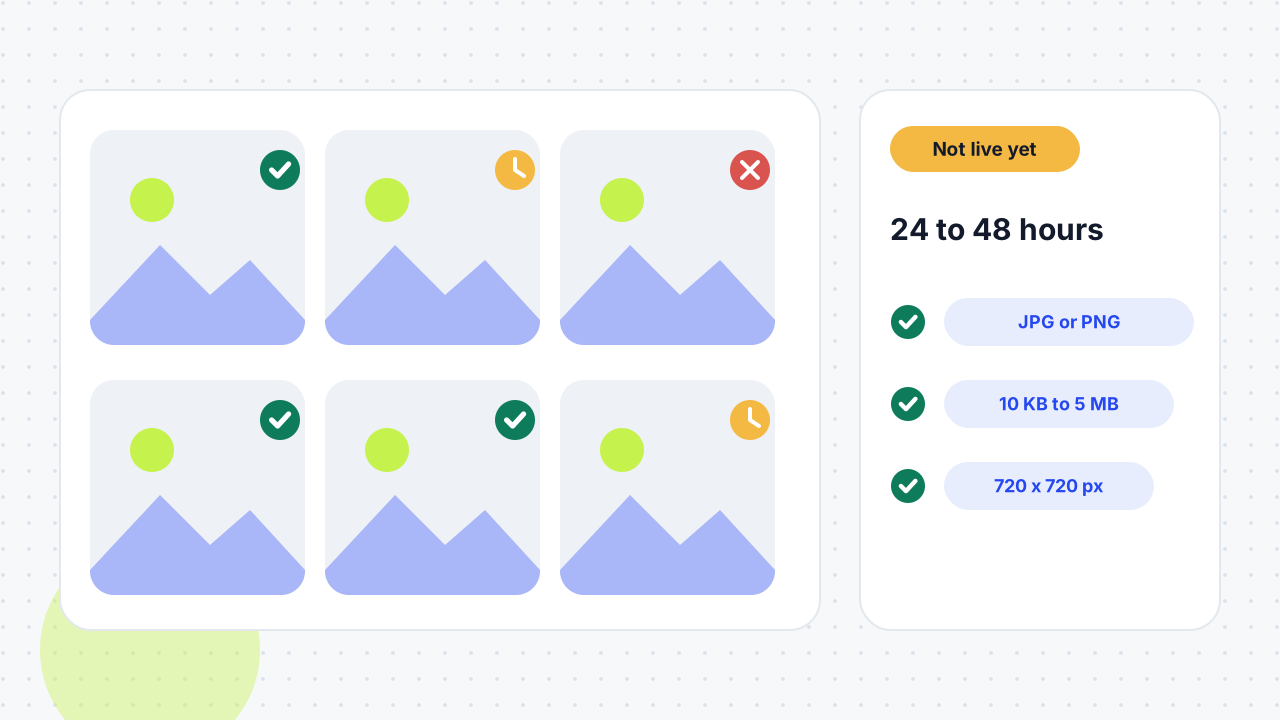
Why aren't my Google Business Profile photos showing?
A photo is missing for one of six reasons: the profile is unverified, the upload is still processing, Google rejected it, it is live but not shown first, it disappeared after going live, or you are looking at the wrong profile. Google says photos and videos appear on Google only after you verify your Business Profile, so verification is the first thing to rule out. If verification keeps failing, read our verification failed guide.
Work out which of the six you have before you upload again. Duplicate uploads don't speed up review and can make the record harder to read.
How do I check my photo status?
Find the upload in your Photos tab and read its status: Pending, Not approved or Live. Then check what customers see while signed out.
- Open the listing. Sign in to the account that manages the profile, open Google Search or Maps, and search for the business name and city.
- Open Photos. Newest uploads appear first. Google says that if an upload is missing, you should check whether it is a duplicate and then try again.
- Read the status. Pending means the photo is uploading, processing or waiting on an unverified profile. Not approved means Google flagged it for breaking a policy. Live means customers can see it.
- Record the upload time. Note the date and time, because the timing rules below depend on it.
- Check signed out. Open the listing in a private window in both Search and Maps and confirm they show the same profile.
How long does Google take to approve photos?
Google says photos and videos can take 24 to 48 hours to appear. ShiftFlow adds that this is a normal processing window, not a guaranteed deadline, so don't upload the same file again while it runs.
New profiles take longer. Whitespark reports that a profile that is too new or was recently reinstated may need 10 to 14 days before uploads publish, and a Google Help community answer says a listing less than two weeks old can be blocked from publishing photos. Whitespark also describes a bug where a photo shows as rejected but publishes after 24 to 48 hours, so a quick "Not approved" is not always final. If the profile also has other edits waiting, see why Google Business Profile edits stay pending.
Which photo rules cause a Not approved status?
"Not approved" means Google flagged the photo for breaking its photo and video policies. The common triggers are below.
File format and size
Photos must be JPG or PNG, between 10 KB and 5 MB. Google recommends 720 × 720 pixels and sets a minimum of 250 × 250 pixels. Videos can run up to 30 seconds, up to 75 MB, at 720p or higher. Whitespark suggests keeping files between 100 KB and 5 MB for better quality.
Quality and what the photo shows
Photos should be in focus, well lit and not heavily filtered or altered, and Google says they should "represent reality". Whitespark adds that the cover photo should clearly show the business, for example the building with its signage, and advises against filters and AI-generated images.
Text, watermarks and copyright
Whitespark says text should cover no more than about 10% of an image and sit near the edges. It also warns against watermarked, copyrighted or stock images and against reusing one photo across several locations. Use your own original images.
Inappropriate content and rapid uploads
Photos that break Google's content policy are not approved. Whitespark also advises adding images gradually, because a large batch may look like bot activity, and says a profile with many weak or spammy photos can be penalised. That last point is one agency's observation rather than a Google rule.
Why is my cover photo or logo not showing?
A cover photo that is live but not first has not failed. Google says the cover photo may not always appear as the first image, and ShiftFlow notes that a cover choice is a preference, not a guarantee. A low-quality cover can also be replaced by a photo submitted by a customer.
A logo needs more than a good file. Google says it may not appear unless the profile includes a name, a valid street-address location, categories, a phone number and opening hours. Complete those fields first. Our Google Business Profile optimisation guide covers every field in order.
Why did my photo disappear after it was live?
Check whether the profile or its media has a restriction, whether the photo still meets current policy, whether the account that uploaded it changed, and whether the photo appears anywhere else on the profile. ShiftFlow advises saving the original file, links, upload date and screenshots before you contact support. If you suspect a spam penalty, Whitespark suggests removing weak photos first and then contacting Business Profile support. If the profile has been suspended, use our suspended profile recovery guide.
What does each photo status mean, and what should you do?
Read the status first, then follow the matching action. The table combines Google's help page with ShiftFlow and Whitespark.
| What you see | What it means | Do this | Don't do this |
|---|---|---|---|
| Profile not verified | Photos won't appear publicly until the profile is verified | Finish verification | Re-upload the same photos |
| Pending, under 48 hours | Still processing | Note the upload time and wait | Upload a duplicate |
| Pending beyond 48 hours | New or reinstated profiles can take 10 to 14 days | Check verification, file rules and profile age | Rename and re-upload |
| Not approved right after upload | Possible policy problem, or the 24 to 48 hour display bug | Check the rules, then wait 48 hours | Change many things at once |
| Not approved after 48 hours | Policy or file problem | Fix one issue and upload one corrected version | Upload from several accounts |
| Live but not first | Google controls cover and gallery order | Confirm it is live in the gallery | Re-upload |
| Logo missing | Profile is incomplete | Add name, address, categories, phone and hours | Replace the file repeatedly |
| Gone after being live | Restriction or policy problem | Check status and keep evidence | Delete and retry blindly |
Before every upload, run a quick check: the file is JPG or PNG, it is between 10 KB and 5 MB, it is at least 250 × 250 pixels and ideally 720 × 720, it is in focus and well lit, text covers little of the frame, it is your own image, and it shows the real business.
What should I do when a photo still does not show?
Fix one clear issue at a time, upload one corrected version, and then ask Google for help with evidence. Renaming the file, adding EXIF data, clearing your cache or uploading from several accounts won't fix a policy or file problem.
- Wait out the window. Give uploads the full 24 to 48 hours, or longer for a new or reinstated profile.
- Fix one issue. Match the file to the format, size and content rules above, then upload a single corrected photo.
- Use the appeal option. Search Engine Roundtable reported in August 2023 that Google added a "Fix photo that doesn't show" option to its appeal form, reached from Google's Business Profile help page by searching for "images not approved". Check that the option still exists in your account.
- Contact support with evidence. Send the original file, links, dates, screenshots, the account used and the correction you tested.
01How long does Google take to approve a Business Profile photo?+
Google says media can take up to 24 to 48 hours to appear. That is a normal processing window, not a guaranteed deadline. Avoid duplicate uploads during that time.
02Why is my cover photo not showing first?+
Google may choose a different cover photo or order. A cover photo that is live in the gallery has not been rejected. A low-quality cover can also be replaced by a customer's photo.
03Should I rename the image and upload it again?+
Only if you want your own files organised. Renaming doesn't fix verification, quality, policy or wrong-profile problems. Fix the actual issue instead.
04Why are photos getting rejected on Google Business Profile?+
The usual causes are low quality or heavy filters, watermarked or stock images, too much text, wrong format or size, inappropriate content and photos that don't represent the business. Some photos show "Not approved" briefly and then publish after 24 to 48 hours, according to Whitespark.
05Why is Google not showing my photos?+
Check verification first, because photos appear only on a verified profile. Then check whether the photo is pending, rejected or live but not first. A new or reinstated profile can also delay publishing for 10 to 14 days.
06Why is my Google profile picture not showing?+
A profile picture on your personal Google account is a different thing from Business Profile photos, so the fixes in this guide won't change it. For a business, the logo and cover photo follow the Business Profile rules above.
07Why are my photos still pending on my Google Business Profile?+
Photos stay pending while Google processes them or while the profile is unverified. Wait 24 to 48 hours, confirm verification and check the profile's age. If it is beyond that window, check the file rules and then contact support.
08Can I upload photos to an unverified profile?+
You can try, but Google says photos and videos appear on Google only after you verify your Business Profile. Until then uploads stay pending. Complete verification first.
09Why can't I publish photos on a new listing?+
A listing less than two weeks old can be blocked from publishing photos, according to a Google Help community answer, and Whitespark says new or reinstated profiles may need 10 to 14 days. Keep the original files and try again after that period.
10How much text can a photo have?+
Whitespark says text should cover no more than about 10% of the image and sit near the edges. Google's own help page asks for photos that represent reality and aren't heavily altered. Keep promotional text off your photos.
11What size should Google Business Profile photos be?+
Use JPG or PNG files between 10 KB and 5 MB. Google recommends 720 × 720 pixels and a minimum of 250 × 250 pixels. Make sure the logo and cover crop well on different screens.
12Can I upload videos to my Business Profile?+
Yes. Google says videos can be up to 30 seconds long, up to 75 MB and at 720p or higher. They go through the same review as photos and show up after the same processing window.
Free SEO audit
Get a straight answer on what to fix first.
Request a free SEO audit and we will come back with the largest constraint on your organic growth and the first practical fix. No sales sequence.
Prefer to hire through Upwork? Hire me on Upwork