Local SEO
Schema Markup for Local Businesses: What to Add and What to Skip
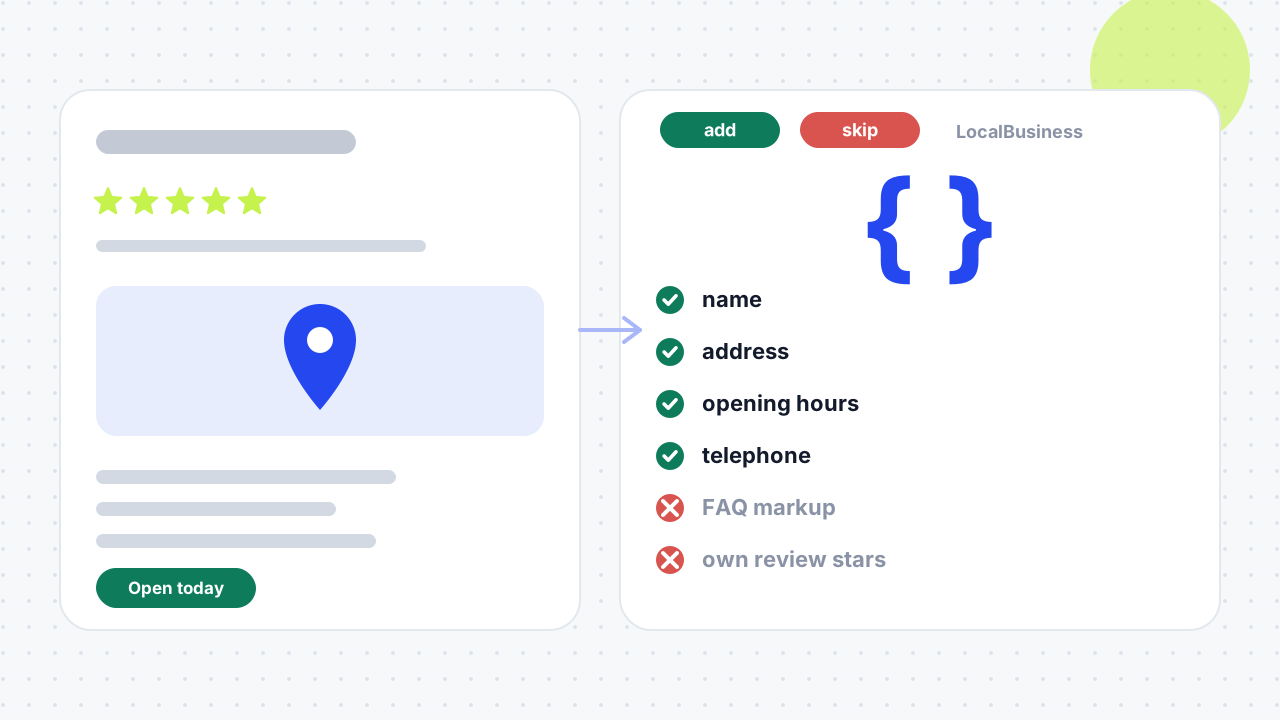
Local business schema markup is structured data, usually JSON-LD, that tells Google a business's name, address, phone number, hours and type in a format it can read. It does not directly raise rankings or guarantee rich results. Add accurate basics that match your Google Business Profile, and skip anything you cannot show on the page.
This guide explains local business schema, what Google says it does, the properties to add, the markup to skip and how to test it. Sources are checked as of 12 November 2026.

What is schema markup?
Schema markup is code that labels the information on a page so search engines can read it without guessing. It uses the shared vocabulary at Schema.org, which Search Engine Journal says was founded by Google, Bing, Yahoo and Yandex in 2011.
What is the difference between schema, structured data and JSON-LD?
Structured data is the practice of describing a page's information in a standard format. Schema.org is the vocabulary of types and properties you use, such as LocalBusiness and telephone. JSON-LD is the format you write it in, and Google lists it as the recommended format ahead of Microdata and RDFa. A rich result is an enhanced search listing that structured data can make a page eligible for, and Google does not guarantee that it will appear.
What does LocalBusiness markup look like?
It is a block of JSON-LD in a script tag that lists your details. This example is fictional, with a placeholder telephone number:
<script type="application/ld+json">
{
  "@context": "https://schema.org",
  "@type": "Dentist",
  "name": "Example Dental Practice",
  "url": "https://www.example-dental.co.uk/",
  "logo": "https://www.example-dental.co.uk/logo.png",
  "image": "https://www.example-dental.co.uk/practice.jpg",
  "telephone": "+44 1234 567890",
  "address": {
    "@type": "PostalAddress",
    "streetAddress": "1 Example Street",
    "addressLocality": "Leeds",
    "addressRegion": "West Yorkshire",
    "postalCode": "LS1 0AA",
    "addressCountry": "GB"
  },
  "geo": { "@type": "GeoCoordinates", "latitude": 53.80080, "longitude": -1.54910 },
  "openingHoursSpecification": [{
    "@type": "OpeningHoursSpecification",
    "dayOfWeek": ["Monday", "Tuesday", "Wednesday", "Thursday", "Friday"],
    "opens": "09:00:00",
    "closes": "17:30:00"
  }],
  "sameAs": ["https://www.facebook.com/exampledental"]
}
</script>Does local business schema help rankings?
No, not directly. Search Engine Journal says structured data is not a direct ranking signal, citing Google's John Mueller, and Techomatic, a UK agency, reaches the same conclusion. What Google's own documentation promises is narrower: markup can make a page eligible for features, and for a local business Google says Search may show a prominent knowledge panel. The page does not mention the local pack, and Google states it does not guarantee that structured data will show up in results.
Markup still earns its place for two reasons. It states your business details in one unambiguous place, and it supports consistency across your website, Google Business Profile and directories, which is the same consistency we cover in our guide to local citations. Treat it as supporting evidence, not a substitute for a well-managed profile. It sits alongside the rest of your local SEO checklist, and AI features are covered in our guide to ranking in AI Overviews.
What should you add?
Add the properties Google lists as required or recommended, using facts that appear on the page and in your profile. Google requires name and address for LocalBusiness and recommends the rest of the properties below.
| Property | Status in Google's guidance | Notes |
|---|---|---|
name | Required | The name customers know, matching your Google Business Profile |
address | Required | Use the full postal address, including postcode and country |
geo | Recommended | Latitude and longitude to at least five decimal places |
openingHoursSpecification | Recommended | Times in hh:mm:ss; hours past midnight go in one specification |
telephone and url | Recommended | Use the same number and canonical address shown on your site |
priceRange | Recommended | Google will not show it if it is 100 characters or longer |
department | Recommended | Listed by Google as a recommended property; use it only if your business really has departments |
logo and image | Suggested by Yoast and Techomatic | Use permanent URLs for your real branding |
sameAs | Suggested by Techomatic | Links to your official profiles, such as Facebook or LinkedIn, and Companies House where appropriate |
areaServed | Suggested by Techomatic | Useful when you serve customers across several towns |
Which business type should you choose?
Use the most specific LocalBusiness subtype that honestly describes you. Google says to use the most specific subtype possible, and Yoast gives HairSalon for a barbershop as an example. Schema.org organises types as a hierarchy: LocalBusiness sits under both Organization and Place, and subtypes such as Dentist, LegalService and ProfessionalService inherit its properties. Techomatic adds that accuracy matters more than specificity, so do not pick a niche type just because it sounds more powerful.
Where should the markup go?
Put business-level markup on your home page or a single page that describes the organisation, which is Google's advice for Organization markup. A business with several branches should give each branch its own location page with its own LocalBusiness block, containing that branch's address, phone number and hours. Techomatic calls pasting the same LocalBusiness markup on every page a common mistake.
What should you skip?
Skip anything you cannot honestly show on the page, and anything Google no longer rewards. This list is the part most guides leave out.
- Skip `LocalBusiness` if you have no public premises.
addressis a required property. A remote or service-area business is usually better described as an Organization withareaServed. - Skip review and rating markup for your own business. Google says
reviewandaggregateRatingare only recommended for sites that capture reviews about other local businesses. Yoast and Search Engine Journal suggest adding ratings, so follow Google's page instead, and never mark up reviews that are not visible. - Skip hidden or invented content. Google says not to mark up content readers cannot see, and spammy structured data can lead to a manual action that removes a page's eligibility for rich results.
- Skip FAQ markup if you want a rich result. Google's FAQ documentation says the FAQ rich result stopped appearing in Search from 7 May 2026. The documentation was removed on 15 June 2026. Keep the questions on the page for readers; the markup no longer earns a result.
- Skip duplicated markup. Do not put the same
LocalBusinessblock on every page, and do not repeat conflicting details across branches. - Skip properties you cannot keep accurate. Techomatic says accuracy matters more than quantity. Out-of-date hours or a second phone number are worse than leaving the property out.
- Skip a generic type when a specific one fits, and skip a niche type that does not.
How do you add local business schema to your site?
Collect your details, generate the markup, test it and keep it current. Follow these steps:
- Write your master business details. Use the name, address, phone number and hours that appear on your Google Business Profile and website.
- Choose the type. Pick the most specific accurate
LocalBusinesssubtype, or Organization if you have no public address. - Generate the JSON-LD. Yoast recommends a generator over hand-writing; a plugin or your site software can also output it.
- Place it on the right page. Add it to the home page or the relevant location page, inside a
<script type="application/ld+json">tag in the<head>or<body>. - Test it. Validate the page in Google's Rich Results Test and fix critical errors, and use the Schema Markup Validator to check the vocabulary.
- Check Google can reach it. Inspect the URL in Search Console, and do not block the page in robots.txt.
- Keep it current. Update the markup whenever your address, phone number or hours change, and look at Search Console's Manual Actions report if you ever see a warning.
Where do you add schema markup on a page?
Add it as a JSON-LD script in the <head> or <body> of the page it describes. Google supports JSON-LD, Microdata and RDFa, and recommends JSON-LD because it keeps the markup separate from your visible content.
What does a real implementation look like?
Our own site shows the trap. Our sitewide JSON-LD declares the type as both Organization and LocalBusiness and lists the name, website, logo, email, description, founder, image, the areas we serve (Leeds, West Yorkshire and beyond) and a contact point. It does not include an address, because we work remotely and do not publish a street address. Google lists address as required for LocalBusiness, so the honest fix is either to drop the LocalBusiness type or to add a real address. We would rather say so than present our markup as perfect. Our service pages use ProfessionalService and Service types with the agency as provider, and our guides add BlogPosting, BreadcrumbList and FAQ markup.
The lesson applies to any local business. The right question is not "which schema can I add?" but "which of these facts are true, visible and kept up to date?".
A worked example from this website
This website describes service coverage in Leeds and Yorkshire, but it has no verified walk-in office in Leeds. Its structured data therefore does not publish a street address or a geo coordinate for the organisation. The area served describes where work can be delivered; it is not a claim that the business is physically based at the centre of a city.
For a real local business, copy only facts the owner can confirm: the legal or trading name, a customer-facing address if one exists, opening hours, contact details and the actual services. Check that the visible page says the same thing. If a business visits customers and hides its address on its profile, do not add an invented map point to its page schema. This is especially important for regulated practices and service-area businesses.
Compare our local SEO service, SEO for plumbers and free SEO audit for related site and profile decisions.
01What is schema markup used for in SEO?+
It describes your content so search engines can interpret it and may make a page eligible for enhanced features such as knowledge panels. It is not a direct ranking factor, so it supports your other local SEO work rather than replacing it.
02Can you give an example of schema markup?+
The JSON-LD block above is an example: it labels a Dentist with a name, address, coordinates, opening hours and a profile link. Swap in your own details and type before using anything like it.
03Do you need schema markup if you have a Google Business Profile?+
It is optional. Your profile is the primary way Google learns about a local business, and Techomatic describes schema as supporting evidence rather than a substitute. Markup is worth adding when you can keep it consistent with the profile.
04Does schema markup help you appear in the map pack?+
Google's local business page does not mention the local pack, and Search Engine Journal says structured data on a location page does not directly affect Google Business Profile features such as the map pack. Focus on your profile, reviews and local relevance.
05Does AI use schema markup?+
Search Engine Journal argues that structured data helps AI systems understand a business. Google's documentation focuses on search features, so treat the AI benefit as a vendor claim and not a confirmed one.
06Should I still add FAQ schema in 2026?+
Only if you have another reason. Google's documentation says the FAQ rich result no longer appears in Search from 7 May 2026. The questions are still valuable on the page; the markup will no longer bring a result.
07Should I mark up my own customer reviews?+
No. Google says review and rating properties are only recommended for sites that capture reviews about other local businesses. Use real reviews on the page and in your Google Business Profile instead.
08How do I test local business schema?+
Paste the URL or code into Google's Rich Results Test and fix any critical errors, then run it through the Schema Markup Validator. Finally, use Search Console's URL Inspection to confirm Google can access the page.
09How can I check whether a website has schema markup?+
Run the page through Google's Rich Results Test or the Schema Markup Validator, or view the page source and search for application/ld+json. Search Console's URL Inspection also shows whether Google can access the page.
10Is schema markup still relevant?+
Yes for describing your business clearly, with limits. It makes a page eligible for features such as a knowledge panel, but Google does not guarantee display, and the FAQ rich result stopped appearing from 7 May 2026. Review any guide that still promises FAQ results.
11What are the main types of schema markup?+
Google's search gallery lists types such as Local business, Organization, Review snippet and Breadcrumb for businesses like yours. Schema.org defines many more, and LocalBusiness subtypes such as Dentist, LegalService and ProfessionalService describe particular kinds of firm.
12What are the required properties for LocalBusiness?+
Google requires name and address. It recommends geo, openingHoursSpecification, telephone, url and priceRange, and says to use the most specific subtype available.
13Do multi-location businesses need separate schema for each branch?+
Yes. Give each location its own page and its own LocalBusiness block with that branch's details. Pasting the same markup on every page is a common mistake, according to Techomatic.
14What is the difference between Organization and LocalBusiness schema?+
LocalBusiness is a more specific type of Organization that also inherits properties from Place, such as geo and opening hours. Use Organization for the business as a whole, and LocalBusiness when a physical location with an address is the point.
15Can I add schema markup myself in WordPress?+
Yes, with a plugin or a generator, and then test the result. Yoast recommends generators over hand-writing and offers its Local SEO plugin, which is a vendor product, so check the output in the Rich Results Test whichever tool you use.
Free SEO audit
Get a straight answer on what to fix first.
Request a free SEO audit and we will come back with the largest constraint on your organic growth and the first practical fix. No sales sequence.
Prefer to hire through Upwork? Hire me on Upwork