Strategy
Keyword Cannibalisation: How to Find and Fix It
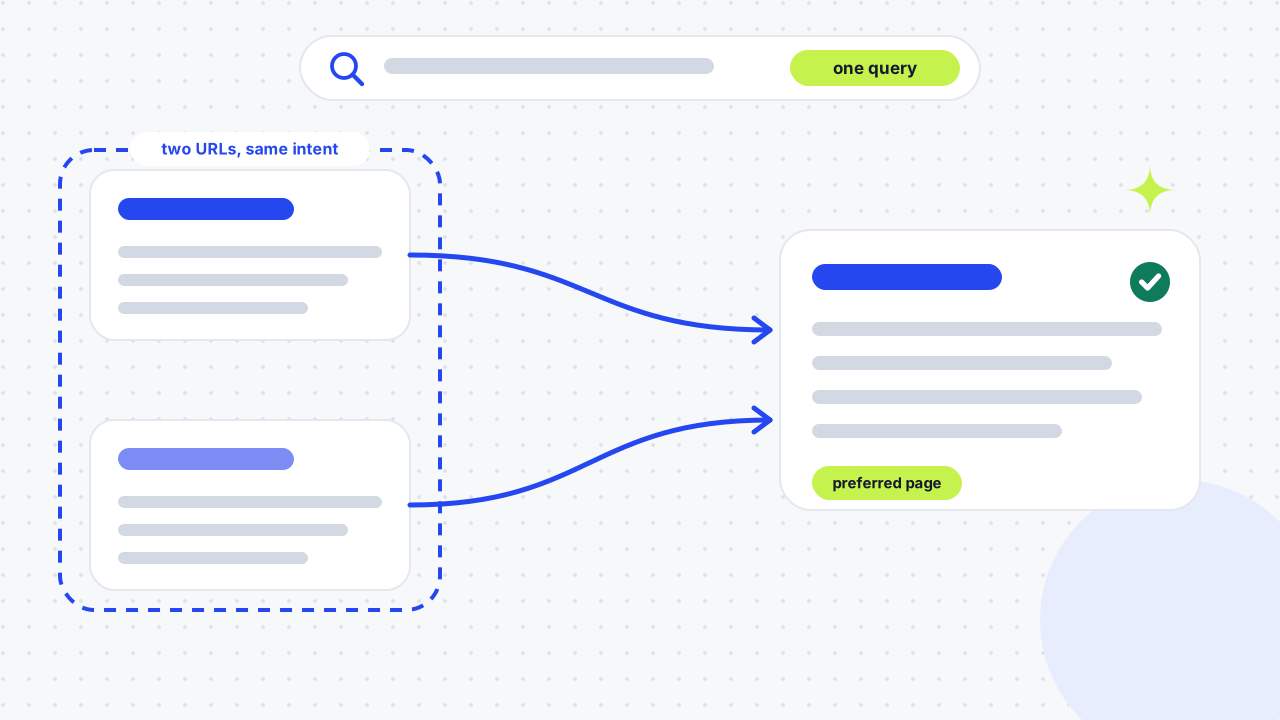
Keyword cannibalisation happens when two or more pages on your own site answer the same search, so Google has to choose between them and your preferred page may not rank. You find it by checking which URLs get impressions for one query in Search Console, then you merge, redirect or differentiate them.
This guide defines keyword cannibalisation, shows how to find it in Search Console, compares the fixes in one table and walks through a real consolidation on our own site. Sources are checked as of 12 November 2026.

What is keyword cannibalisation?
How does it differ from duplicate content?
Keyword cannibalisation means pages that target the same or a very similar keyword and serve the same intent. Duplicate content means pages whose text is identical or nearly so. Two pages can cannibalise each other without sharing a sentence, for example a service page and a long guide that both try to rank for "seo audit". Yoast also separates keyword cannibalisation from *content* cannibalisation, where several articles cover the same topic even if their target keywords differ.
Is "cannibalisation" the same as "cannibalization"?
Yes. Cannibalisation is the UK spelling and cannibalization the US one, and Google's UK autocomplete suggests both. Search for both when you check your own site, because articles and tools use each.
Is keyword cannibalisation actually bad?
It is bad only when several of your pages share the same intent and that overlap hurts results. Semrush notes that a search engine might pick just one of the pages to rank. If your preferred page isn't the one chosen, it could miss out on backlinks that would have strengthened its authority. Ahrefs adds an important caveat: a page usually ranks for many keywords, so sharing a keyword is not a problem by itself, and Google doesn't get "confused" by two pages about similar things.
When is it not a problem?
Overlap is harmless when the pages answer different questions for different people. A service page that targets people ready to hire and a guide that targets people learning the topic can both mention the same phrase and both earn clicks. Treat it as a problem when the wrong page ranks, when two pages swap places, or when impressions are split across URLs and none of them performs. If a page is not ranking and you cannot tell why, work through why a website is not ranking.
How do you find keyword cannibalisation?
Look for one query that sends impressions to more than one of your URLs, then check whether those URLs have the same intent. Follow these steps:
- Choose the query. Start with a phrase you want a specific page to win, or a page that ranks worse than it should.
- Open Search Console. In the Performance report for Search results, add a Query filter for your phrase.
- Switch to the Pages tab. The report groups data by Queries, Pages, Countries and Devices. Under Pages, you see clicks, impressions, CTR and average position for each URL that appeared for that query.
- Look for two or more URLs. If two of your pages share most of the impressions, they are competing. Note which one Google shows more often and which one you intended.
- Open both pages and compare intent. Ask whether they answer the same question for the same reader.
- Log the result. Record the query, the URLs, the clicks, the impressions, the average position, the intent and your decision in one place.
How do you check quickly with a site: search?
Search site:yourdomain.com "your keyword" in Google to list the pages on your site that mention a phrase. Yoast, Semrush, Ahrefs and Red Evolution all suggest this as a first check. It shows which pages exist on a topic, not how they rank, so confirm anything you find in Search Console.
What do paid tools add?
Rank trackers can automate the search. Semrush's Position Tracking has a cannibalisation report, and Ahrefs' Organic keywords report can be filtered to "Multiple URLs only". They are useful on large sites; on a small site, Search Console is enough.
How do you decide whether to merge, redirect or differentiate?
First identify one preferred page for the query, then choose the fix that matches the situation. Semrush's guide describes four techniques: redirects, canonical tags, differentiating the pages and noindex tags.
| Situation | Fix | Why |
|---|---|---|
| Same intent, one page is weaker or out of date | 301 redirect the weaker page to the stronger one, after moving over anything useful | Consolidates the signals in one URL |
| Same intent, both pages have traffic or links | Merge them into one stronger page and redirect the other | Keeps the page with the most traffic or links and adds the best of the second |
| Similar topic, different intent | Differentiate: retitle, refocus headings and link between them | Merging pages with different intent can hurt both |
| Near-identical copies that must both exist | Canonical tag | Suits true duplicates, not cannibalisation |
| A page users need that should not rank | Noindex, as a last resort | Removes the page from search entirely |
| A page with no traffic, links or purpose | Delete, after checking | Checking first avoids losing value |
When should you merge or redirect?
Merge or redirect when two pages do the same job. Google calls a redirect a strong signal that the target should become the canonical URL, so a 301 tells it which page to show. Pick the page with more traffic or links as the survivor, move any useful sections across, then redirect the other.
When should you differentiate instead?
Differentiate when each page serves a different reader. Give each a distinct main phrase, make the headings answer different questions, and link them to each other so Google can see how they relate. Yoast warns against merging pages that target different search intent, because that can reduce relevance for both.
What about canonical tags, noindex and deleting?
Use them sparingly. Ahrefs says a canonical tag is only suitable for near or exact duplicates, and that noindex is a poor fix because the page stops ranking for everything. Both Ahrefs and Yoast warn against deleting a page before you have checked its traffic, backlinks and search performance. Google describes a canonical tag as a signal rather than a command, so it may still choose a different URL.
What should you do after the fix?
Update the internal links so they point at the surviving page, and test the redirect on the live URL. Then watch Search Console over the following weeks, because Google has to recrawl and reprocess the change.
What does a real fix look like?
Our own site had this problem. In a 90-day Search Console export ending 27 October 2026, the query "seo agency leeds" drew 1,820 impressions spread across eight of our URLs. /about/ had 493, /contact/ 327, /seo-agency-leeds/ 264 and the homepage only 64, at average positions between about 84 and 95. A separate page, /seo-agency-leeds/, also duplicated the homepage for the same head term. We made two changes.
On 22 October 2026 we redirected /seo-agency-leeds/ to the homepage with a 301, moved its coverage content onto the homepage, repointed 24 internal links and retitled /about/ so it stopped competing for commercial queries. Our hosting ignored the redirect rules we had written, so the old URL kept returning a 404 error until a _redirects file was added on 31 October. That change also stopped adding our brand name to the titles of most pages, because the exact-match name had made About and Contact look like better matches for "seo agency leeds" than the homepage. We have not measured a result yet, so treat this as a method, not a case study. The lesson is practical: a fix is not finished until you have loaded the old URL and seen the redirect work. Our duplicate-content case study shows a related fix on another site.
How do you prevent keyword cannibalisation?
Give every page one primary target keyword and one clear intent before you publish, and check whether multiple pages already cover it. Semrush's advice is to map keywords to URLs before publishing so every page has a unique angle. Yoast suggests a content brief that states the target keyword and intent, plus regular audits of your most important topics. Our own content calendar has an "overlap check before writing" column for this reason: each new post names the existing pages it could collide with and how it stays different.
01Is keyword cannibalisation the same as product cannibalisation?+
No. Product cannibalisation is when a company's new product takes sales from its own existing product. Keyword cannibalisation is about web pages competing for the same search, so the two terms share a word but describe different problems.
02What is an example of keyword cannibalisation?+
A common example is a service page and a blog post that both target "seo audit". Another is two guides that answer the same question with small wording changes. Location pages that differ only by the town name can also overlap, which is why each needs something genuinely local.
03Is keyword cannibalisation a Google penalty?+
No. It is a competition between your own pages, not a penalty. Ahrefs argues that Google doesn't get "confused" by multiple pages on a similar topic; the harm comes when the wrong page ranks or when your visibility is split between URLs.
04How do I check for keyword cannibalisation for free?+
Use Search Console. Filter the Performance report by your query, open the Pages tab and see whether more than one URL appears. A site: search shows which pages exist on the topic, and the two together are enough for most small sites.
05How do you calculate cannibalisation?+
There is no official metric. Compare the impressions, clicks and average position of each URL that appears for the same query, then judge whether they serve the same intent. A query where two URLs share the impressions is the warning sign.
06Should I delete the weaker page?+
Not before you check it. Look at the page's traffic, backlinks and search performance first, then merge it into the stronger page and redirect it. Deleting without a redirect throws away whatever value the page had.
07Do canonical tags fix keyword cannibalisation?+
Not usually. Canonical tags suit near-identical duplicate pages, and Google treats them as a signal, not an instruction. If two pages answer the same question, merging them with a 301 redirect is the more reliable fix.
08Can a blog post and a service page cannibalise each other?+
Yes, when both target the same phrase. Differentiate them by intent: let the service page serve people ready to hire, and make the blog post teach, then link between the two.
09How long does it take to see results after fixing cannibalisation?+
There is no fixed time. Google has to recrawl the pages and reprocess the redirects, so check Search Console across the following weeks, not days, and judge the result by whether the preferred page now appears for the query.
10Does cannibalisation affect AI search?+
Semrush says it can affect AI citations as well as rankings. A site with one clear page per question gives search engines and AI tools a single source to use.
11How often should I check for cannibalisation?+
Check whenever you add content to a topic you already cover, and run a review of your most important queries on a regular schedule. Our own site playbook schedules a monthly pass for any query where two or more URLs appear.
Free SEO audit
Get a straight answer on what to fix first.
Request a free SEO audit and we will come back with the largest constraint on your organic growth and the first practical fix. No sales sequence.
Prefer to hire through Upwork? Hire me on Upwork