Technical SEO
Internal Linking for SEO: How to Build a Link Structure That Helps Pages Rank
Internal linking means linking one page on your site to another so that search engines can find your pages, see how they relate and judge which matter most. Link every important page from at least one other relevant page, use descriptive anchor text and keep your key pages a few clicks from the homepage.
This guide explains internal links, how to build a structure around topic clusters, how to write anchor text and how to audit the links on your own site, with a worked example from ours. Sources are checked as of 12 November 2026.

What is internal linking in SEO?
How do internal links differ from external links and backlinks?
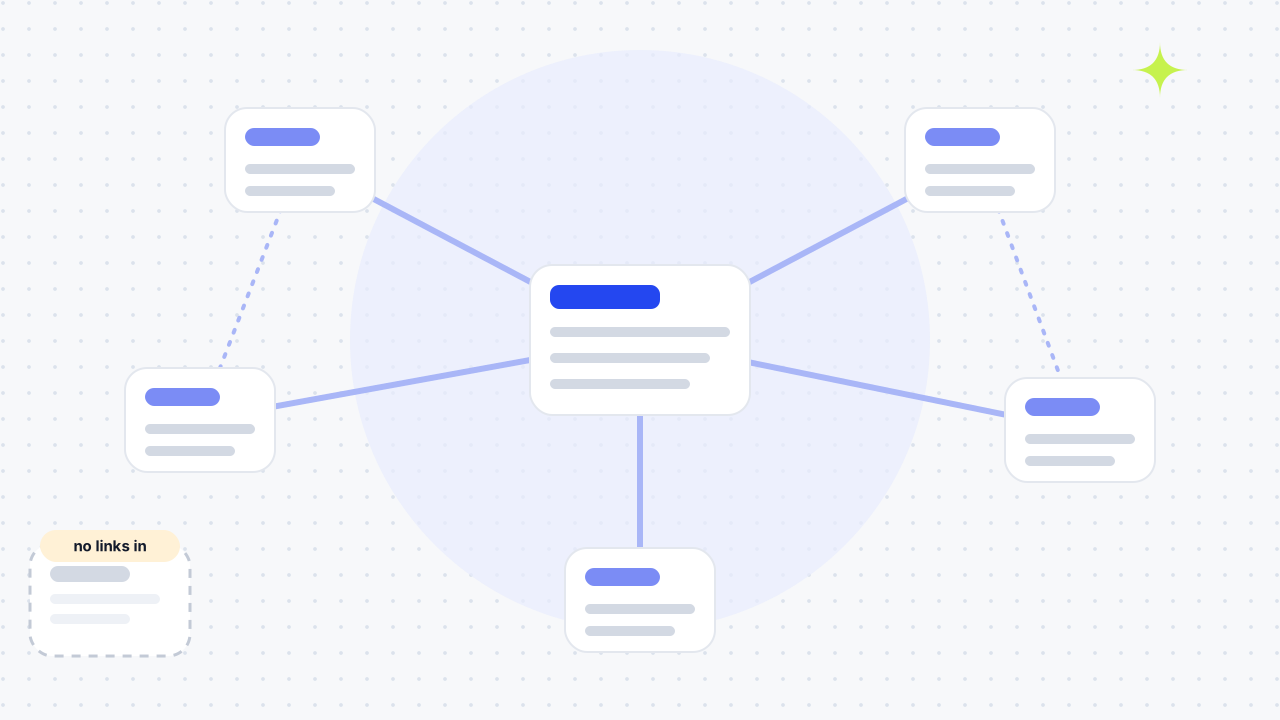
An internal link points from one page to another page on the same domain. An external link points to a different domain. A backlink is an external link from another site to yours, so it is the same link seen from the receiving end. You control internal links completely, which is why they are one of the few ranking levers you can fully set yourself.
What are structural and contextual links?
Structural links stay the same across your site, such as navigational links in the main menu, footer links and breadcrumbs, and some guides add sidebar links. Contextual links sit inside the body of a page and change with the content. Semrush, Moz and Yoast all draw this line, and Yoast notes that footer links usually hold less SEO weight than contextual ones. Contextual links are the ones you write on purpose, so most of this guide is about them.
Why does internal linking help pages rank?
Internal links help in three ways: they let Google find pages, they tell it what a page is about and they guide visitors to the next useful page, which improves the user experience. On a shop, that includes links between category and product pages.
Discovery. Google says it uses links to find new pages to crawl and as a signal of relevance. It adds that every page you care about should have a link from at least one other page on your site. A page with no links pointing to it, an orphan, is harder to find and often stays unindexed.
Context. The anchor text, the clickable words, describes the target page. Google's guidance is that anchor text should be descriptive, reasonably concise and relevant to the page it is on.
Authority. Moz, Semrush and Yoast say internal links spread link equity, the ranking strength a page earns from backlinks, from strong pages to weaker ones. Treat that as a reason to link from your most-linked pages to the ones you want to lift, not as a guarantee of a ranking.
How do you build an internal linking structure?
Start from the pages that earn you business, then connect the supporting content around them. This plan is your internal linking strategy. Follow these steps:
- List your main pages and your supporting pages. Main pages are your home page, services, pricing and blog hub. Supporting pages are guides, FAQs and case studies that add context.
- Group content into [topic clusters](/blog/how-to-do-keyword-research/). Pick a broad pillar page and several narrower cluster pages on its subtopics, as Semrush, Moz and Yoast all suggest.
- Link up, down and across. Link each cluster page to its pillar, the pillar to each cluster page and related cluster pages to each other, using sentences that make sense to a reader.
- Link new content the day you publish it. Add links from older, relevant pages to the new one, because new pages have few links of their own. Yoast warns against linking from random pages; link only where the topics match.
- Write descriptive anchor text. Say what the reader will find, not "click here".
- Keep key pages shallow. Make sure your important pages are reachable in a few clicks from the home page.
- Use real links. Every link should be an
<a>element with anhref.
How should you write anchor text?
Describe the destination in a few words, and vary it naturally. Google suggests a test: read only the anchor text out of context and check that it makes sense on its own. Generic phrases such as "click here" or "read more" tell readers and Google little. Semrush recommends keeping anchors to five words or fewer, and Yoast and Backlinko both say some exact-match anchors are fine if you mix them with variations.
How many internal links should a page have?
There is no fixed number. Google offers no set count but warns that if a page seems to have too many links, it probably does. Semrush likewise says there is no set number, and fewer, targeted links usually read better. Moz's guide repeats an older rule of thumb of about 150 links per page, but Google gives no figure. Add a link wherever it genuinely helps the reader.
Does the structure of the site matter?
Yes. Moz recommends a pyramid, with the home page at the top, categories below and individual pages at the bottom, so that every page is only a few clicks from the home page. Semrush says a page more than three clicks from the home page may signal that it matters little and attributes this to Google. Keep your most valuable pages close to the top.
How do you audit your internal links?
An audit counts the internal links pointing at each page, so you can see which pages are buried and which are overloaded. Our SEO audit checklist shows where this fits. Follow these steps:
- Export every link. Crawl the site, or read your CMS or build output, and list each link as a source page and a target page.
- Count inbound links per page. Count links from the body of other pages separately from menu and footer links, which appear everywhere and tell you little.
- Flag the extremes. Mark pages with no inbound link (orphans) and pages with only one. Semrush notes that orphaned pages usually stay unindexed.
- Check the [Search Console Links report](/blog/gsc-opportunities/). Its Top internally-linked pages table ranks your pages by how often they are linked from within your site. Google says the report is a sample, not a complete list, and limits tables to 1,000 rows.
- Fix [broken links](/blog/fix-technical-seo-issues/) and redirects. Point links straight at the final URL rather than at a redirected one, and repair links that return a 404 error.
- Review the anchors. Replace generic labels with descriptive ones.
- Add links to the buried pages. Link to them from relevant pages that already get traffic and links.
- Repeat after big changes. Run it again after publishing in bulk or restructuring, and on a regular schedule.
What does an internal-link audit find in practice?
Counting turns a feeling into a list. On 12 November 2026 we counted the links in our own built site, which has 118 pages in its sitemap. We counted only links inside the page body, leaving out the menu, header and footer.
| What we counted | Result |
|---|---|
| Links inside page bodies | 2,359 |
| Median body links pointing at a page | 10 |
| Pages with no body link pointing at them | 1 (the HTML sitemap page, which is linked from the footer) |
| Blog posts (45) with the fewest body links | 4 |
| Most-linked pages | /free-seo-audit/ (114) and /contact/ (113), our calls to action |
| Case studies (9) with no body link from outside the case-study section | 5 |
The averages looked healthy, but the case studies show why you need page-level counts. Each case study had between 9 and 13 body links pointing at it, yet most of those came from sibling case studies. Five of the nine had no body link from anywhere else on the site. Our earlier fix added contextual links to four of the case studies from service pages and guides; the other five were still waiting. We also found 66 links whose anchor text was just "Read article", which fails Google's out-of-context test and should describe the post instead.
Which internal-linking mistakes should you avoid?
Most problems come from broken, buried or vague links. These are the ones to look for. If two pages compete for one search, that is keyword cannibalisation.
| Mistake | Why it hurts | Fix |
|---|---|---|
| Orphaned pages | Google may not find or index them | Link from at least one relevant page |
| Generic anchor text | Tells readers and Google nothing | Use descriptive text |
| Links to redirected URLs | Adds a needless hop to every click | Link to the final URL |
| Redirect chains | Each hop slows crawlers and users | Collapse them to one redirect |
| Nofollow on internal links | Semrush says it tells Google not to pass authority | Remove it unless you have a reason |
| Links that need JavaScript, forms or a search box to appear | Moz says spiders will not submit forms or run searches | Use standard HTML links |
| Hundreds of links on one page | Hard for users and crawlers to tell which matter | Cut to the links that help |
| Linking unrelated pages | Weakens the topic signal | Link only where the topics match |
A worked example from this website
This site gives a live example of link priority. A common sidebar link pointed to the contact page across many guides. We changed that shared call to action to the free audit, then added contextual links from the About, pricing and case studies pages to the homepage that owns the Leeds agency query. A navigation link tells a crawler that a URL exists; a sentence in the relevant page explains why it matters.
To audit a similar site, export internal links from a crawl, separate template links from main-content links, and inspect the target page for each important query. Check whether an informational page points to the service page it supports and whether a page with commercial value is reachable from more than the global menu. Our services hub now links directly to the App Store and voice search pages, which previously had very few contextual paths.
If you want help planning the hierarchy, see our SEO services, technical SEO service and free SEO audit.
01What are internal links?+
Internal links are hyperlinks that point from one page of your website to another page on the same domain. Menus, footers, breadcrumbs and links inside your articles are all internal links.
02What is the difference between internal and external linking?+
Internal links connect pages on your own domain, while external links point to a different site. You can add as many internal links as you like. External links send readers away, so use them where another source genuinely helps.
03What is an example of internal linking?+
In an article about local search you might write "follow our local SEO checklist", which sends the reader to a related page. In HTML it is an <a href="/blog/local-seo-checklist/"> element with the anchor text "local SEO checklist".
04Do internal links help SEO, and do they pass link equity?+
Moz, Semrush and Yoast all say they do, spreading ranking strength from pages that earn backlinks to the pages they link to. Google describes links as a signal of relevance and a way to find pages, so use internal links to support priority pages rather than expecting a fixed result.
05What are the main types of links?+
There are three. Internal links connect pages on your own site, external links point from your site to another domain and backlinks are links from other sites to yours. Internal links are the only type you fully control.
06What is an orphan page?+
An orphan page has no other page on your site linking to it. Google discovers pages mainly by following links, so an orphan is harder to find and often stays unindexed. Fix it by adding a link from a relevant page.
07Should I use exact-match anchor text for internal links?+
Some exact-match anchors are fine, but mix them with natural variations and keep them descriptive. Backlinko and Yoast both say a few exact matches are acceptable, and Google's concern is that the anchor is clear and relevant, not that it repeats a keyword.
08Are footer and menu links worth having?+
Yes for navigation, but they carry less weight than links inside the content. Yoast says footer links may not hold as much SEO weight as contextual links, and menu links appear on every page, so they do not tell Google which pages relate to each other.
09Should internal links be nofollow?+
Generally no. Semrush says a nofollow attribute on an internal link tells Google not to pass authority to that page, and you normally want internal links to pass value. Use nofollow only where you have a specific reason.
10How deep should important pages be?+
Keep them within a few clicks of the home page. Semrush warns that a page more than three clicks deep may look unimportant, and Moz recommends a pyramid structure so every page is reachable quickly.
11Does internal linking matter for AI search?+
It helps AI crawlers understand your site too, according to Semrush and Yoast, which both describe internal links as a signal for AI platforms. Treat that as supported by the vendors' own analysis rather than measured by Google.
12How often should I audit internal links?+
Check whenever you publish a batch of content or change your structure, and run a fuller audit on a schedule. Semrush suggests a monthly site audit; for a smaller site, a quarterly review is usually enough.
Free SEO audit
Get a straight answer on what to fix first.
Request a free SEO audit and we will come back with the largest constraint on your organic growth and the first practical fix. No sales sequence.
Prefer to hire through Upwork? Hire me on Upwork